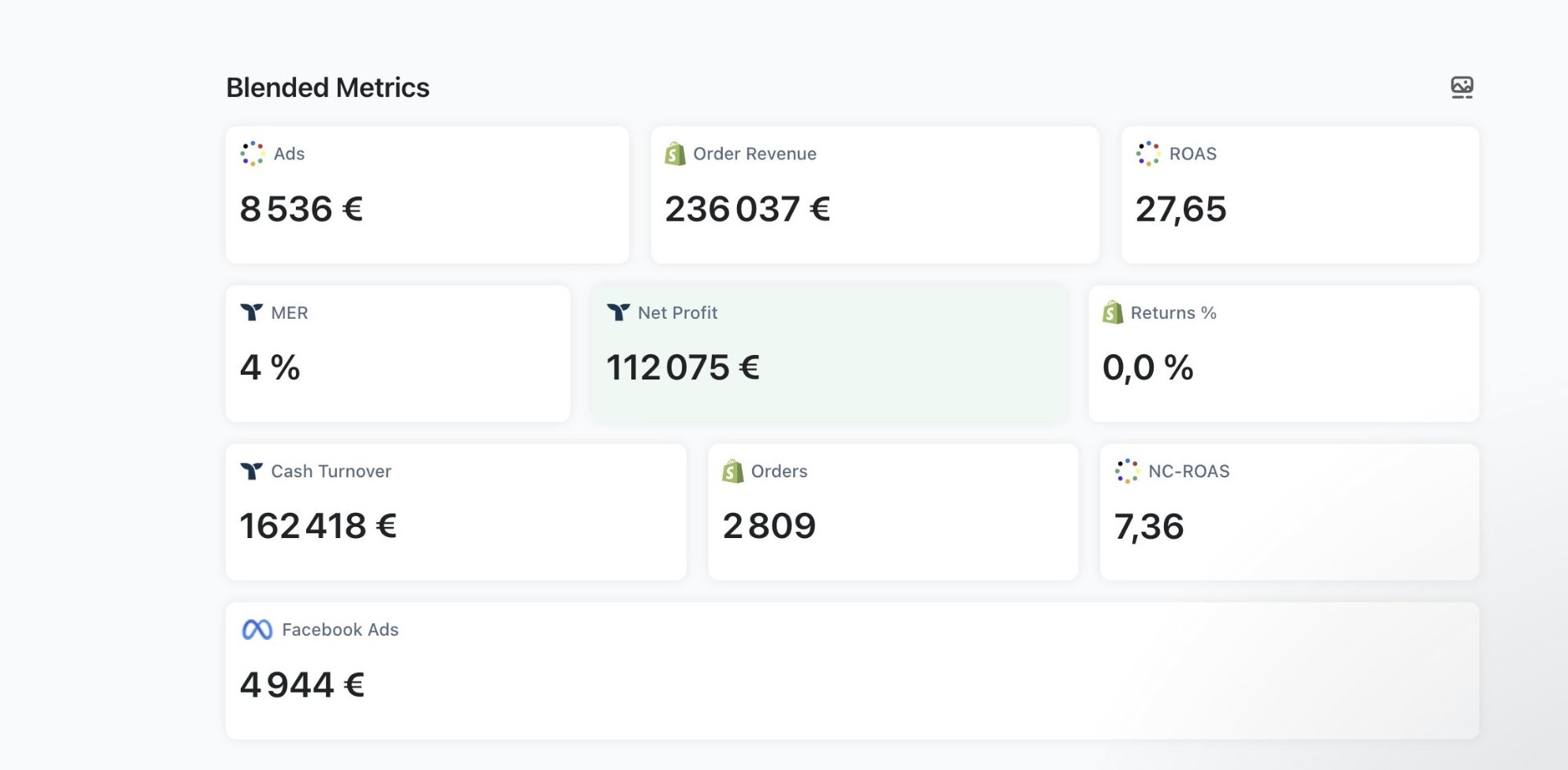
One of our clients generated 240K€ in a single day with 110K€ in net profit during their Black Friday thanks to a simple but remarkably effective strategy combining email and WhatsApp.
The idea is simple but powerful:
Create an exclusive VIP list for your Black Friday
Offer an attractive giveaway (e.g. 100 "golden tickets" up for grabs)
Collect the emails AND WhatsApp numbers of your prospects
Warm up your audience for 10-14 days before the launch
Explode your sales on launch day with an ultra-targeted messaging strategy

Your giveaway must be a "no brainer": so obvious and desirable that people sign up without thinking.
Examples by industry:
Cosmetics: 100 golden tickets to win a year of products
Apparel: 50 golden tickets to win 1000€ of shopping
Travel: 10 golden tickets to win an all-inclusive trip
Food: 100 golden tickets to win a free one-year subscription
The giveaway rules:
100 golden tickets to distribute among VIP members
To enter: be a VIP member + place an order during Black Friday
Each ticket can win up to a year of products
Highlight 4 VIP perks:
Access to exclusive products
The biggest promos of the year
Gifts in every order
Automatic entry into the "golden tickets" giveaway
Learn more: Inbound Automations and Opt-in Collection.
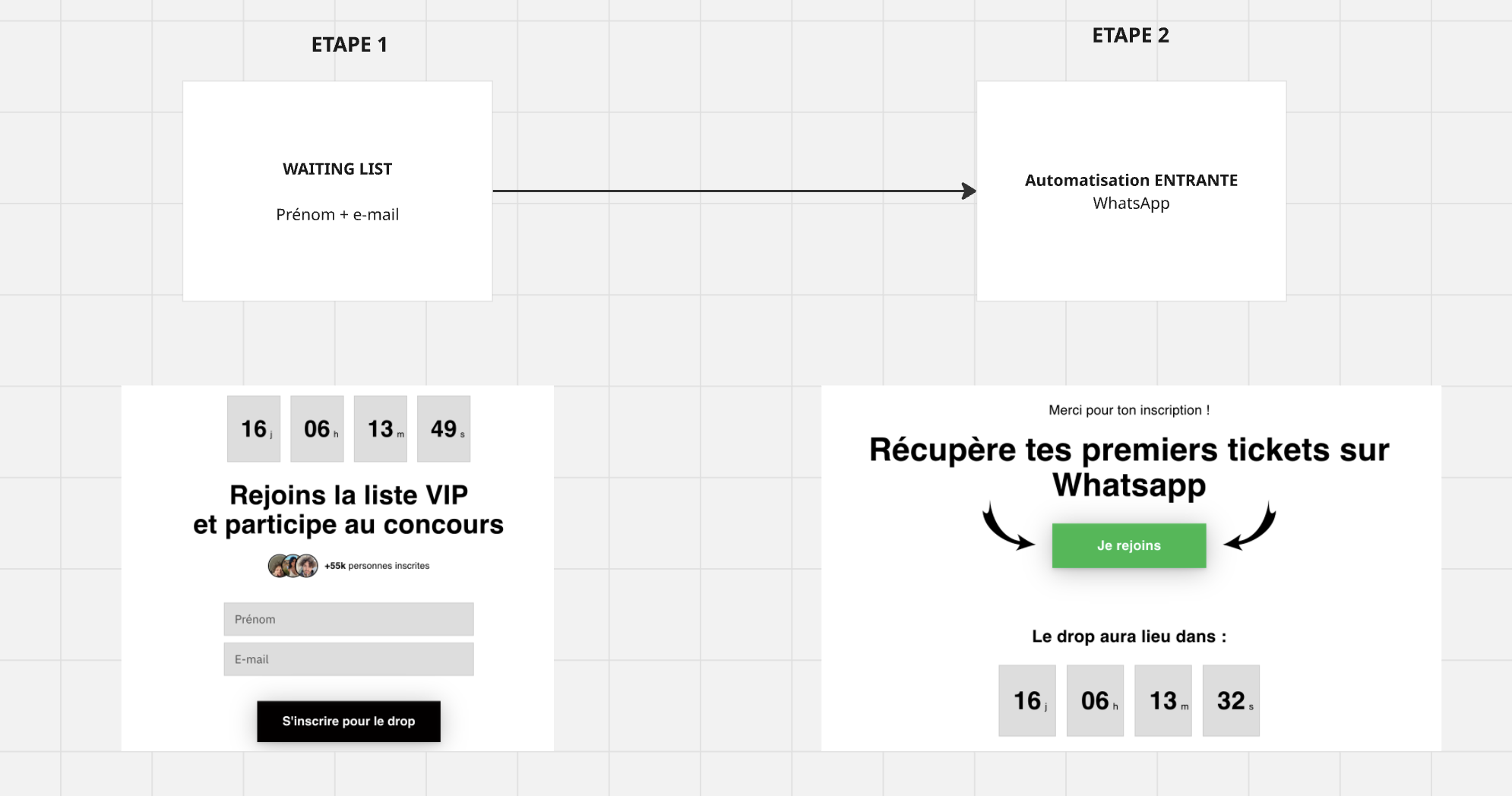
Create a clear page that explains:
The 4 perks of being a VIP
The "golden tickets" giveaway (rules, prizes)
A simple form: First name + Email
Important: Do NOT ask for the WhatsApp number here. You will collect it right after, on the thank you page.
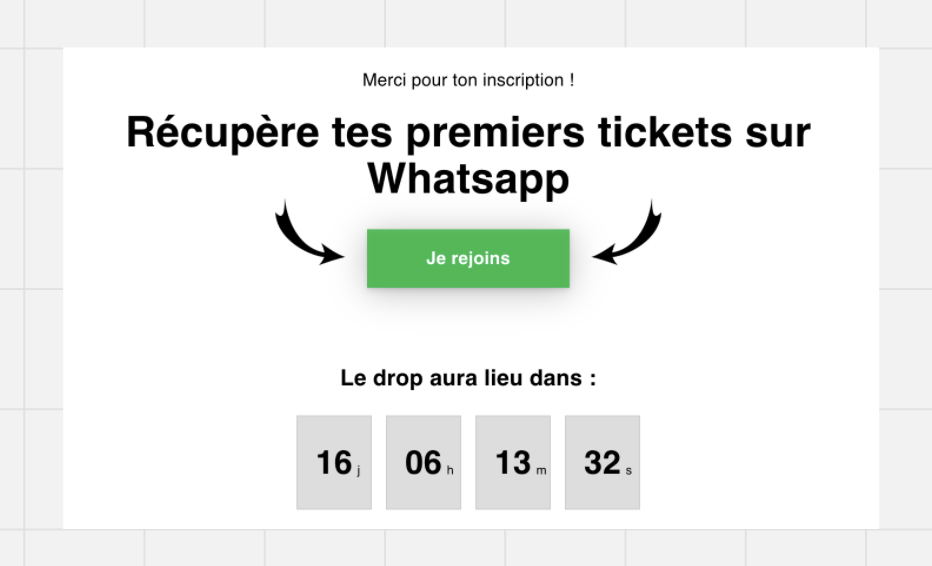
After the email signup, redirect to a thank you page hosted on your site.
Sample message:
"Thanks for joining the VIP Club! 🎉
Double your chances of winning and get the exclusive perks directly on WhatsApp.
[Button: Activate WhatsApp VIP]"
On your thank-you page, add an "Activate WhatsApp VIP" button that opens the magic link created in step 4.
The message your prospects will automatically send must be pre-written:
Recommended message:
I want to join the Black Friday VIP Club and enter the 100 golden tickets giveaway

(SEND THIS MESSAGE)
The characters ! ? # and emojis are not accepted in the pre-filled message of a magic link: remove them from your message.
Copy the magic link URL (see step 4) and add it to your thank you page as the main button.
In the left menu, open Lists & Segments.
Create a new list: "VIP Black Friday".
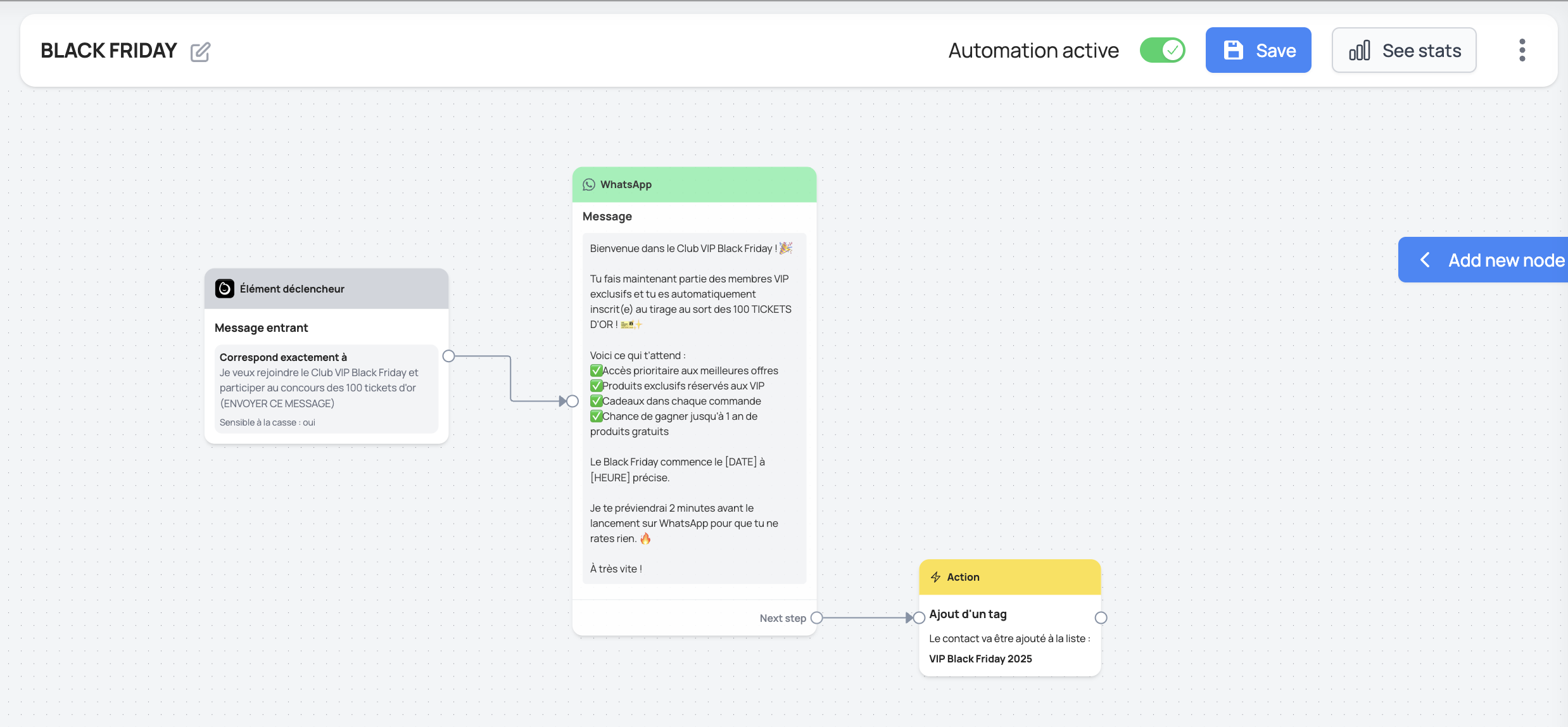
Go to Automations > Create an automation > Start from scratch, then choose the Inbound message trigger.
Trigger: when someone sends the pre-filled message. Preferably choose the "Exact match" mode and reuse the magic link message as is. With the "Contains" mode, use a precise phrase such as "Club VIP Black Friday": a short keyword like "VIP" would also trigger the flow on unrelated messages.
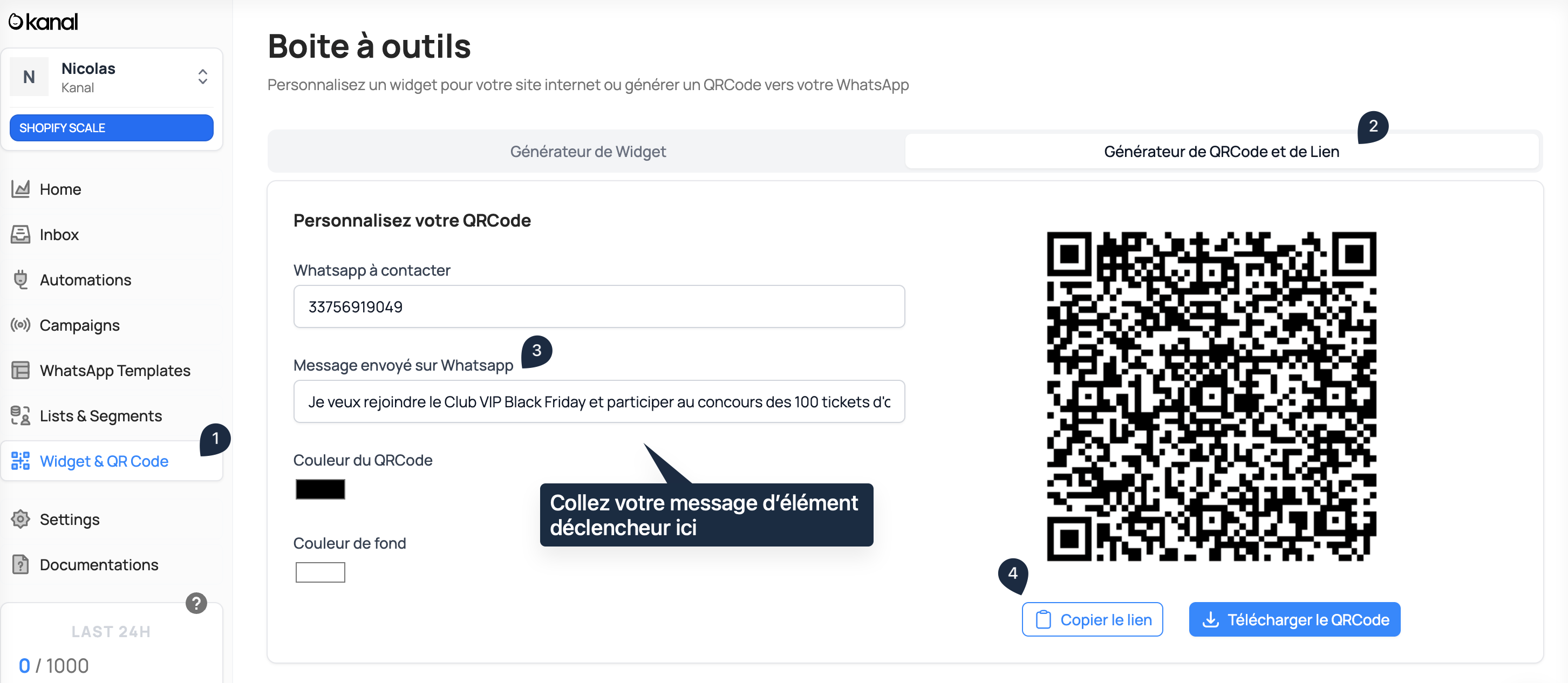
In the left menu, open Magic Links.
Click Create a magic link.
In the pre-filled message field, paste your trigger message.
Copy the link URL.
Paste this URL on the button of your Shopify page.
Welcome to the Black Friday VIP Club! 🎉

You are now one of our exclusive VIP members and you are automatically entered into the draw for the 100 GOLDEN TICKETS! 🎫✨

Here is what awaits you:
✅ Priority access to the best offers
✅ Exclusive products reserved for VIPs
✅ Gifts in every order
✅ A chance to win up to 1 year of free products

Black Friday starts on [DATE] at [TIME] sharp.

I will message you on WhatsApp as soon as it starts so you don't miss a thing. 🔥

See you soon!
Actions after this message: add the Add to list action ("VIP Black Friday" list) and the Opt-in / Opt-out action, set to opt-in, to record the contact's consent.
See Understanding and using lists on Kanal.
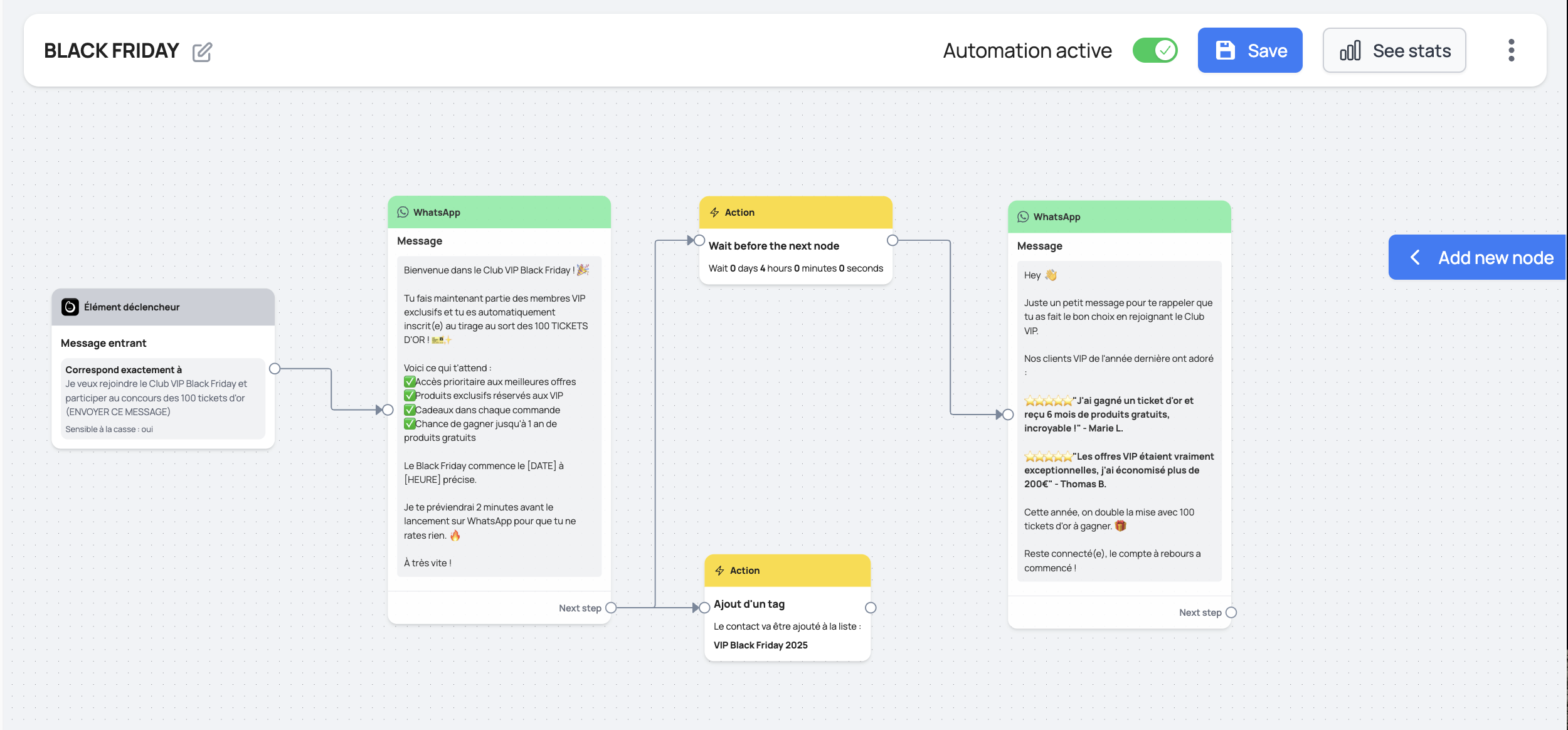
Hey [First name]! 👋

Just a quick message to remind you that you made the right choice by joining the VIP Club.

Last year's VIP customers loved it:

⭐⭐⭐⭐⭐ "[Real customer review 1]" - [First name L.]

⭐⭐⭐⭐⭐ "[Real customer review 2]" - [First name L.]

This year, we are doubling down with 100 golden tickets up for grabs. 🎁

Stay tuned, the countdown has started!
Only use real customer reviews, with their authors' permission.
Starting at D-7, send one WhatsApp campaign per day to your "VIP Black Friday" list.
In Campaigns, create a new campaign, create the template directly in the builder, then choose the "VIP Black Friday" list as the audience. At the sending step, choose Schedule for later and set the date and time: this option also works while the template is still pending Meta's approval. If the template is not approved within 72 hours of the planned send time, the campaign is paused; you can resume it once the template is approved. See Schedule, pause, resume or reschedule a campaign.
See Launch a campaign with the campaign Builder.
Subject (for you): D-7 Black Friday - Perks reminder
Message:
Only 7 days until the VIP Black Friday! ⏰

As a reminder, here is what awaits you as a VIP member:

🎁 100 golden tickets to win (value: up to 1 year of products)
💰 The biggest promos of the year
🎀 Gifts included in every order
✨ Access to exclusive products

The launch takes place on [DATE] at [TIME] sharp.

I will message you on WhatsApp as soon as it starts. 🔔

Be ready! 🔥
Repeat this type of message every day, changing the angle:
D-6: Customer testimonials from last year
D-5: Sneak peek of an exclusive product
D-4: Reminder of the giveaway rules
D-3: Creating urgency ("Only X VIP spots left")
D-2: Behind the scenes of the preparation
D-1: Final countdown
End your marketing messages with "Reply STOP to unsubscribe": the unsubscribe is detected when the customer types this word. See Managing unsubscribes (Opt-out) on WhatsApp.
Same strategy with 1 email per day to keep both channels in sync. The Klaviyo integration requires the Scale plan.
See Klaviyo integration with Kanal.
In your warm-up emails, add a button:
"Notify me when the Black Friday starts on WhatsApp"
Strategy:
Create a magic link with the message: "Notify me when Black Friday starts".
With an Inbound message automation and the Add to list action, add these people to a sub-list: "Ultra Hot VIPs".
These people will have an even higher purchase rate on launch day.
See also The complete guide to collecting WhatsApp opt-ins and Inbound Automations and Opt-in Collection.
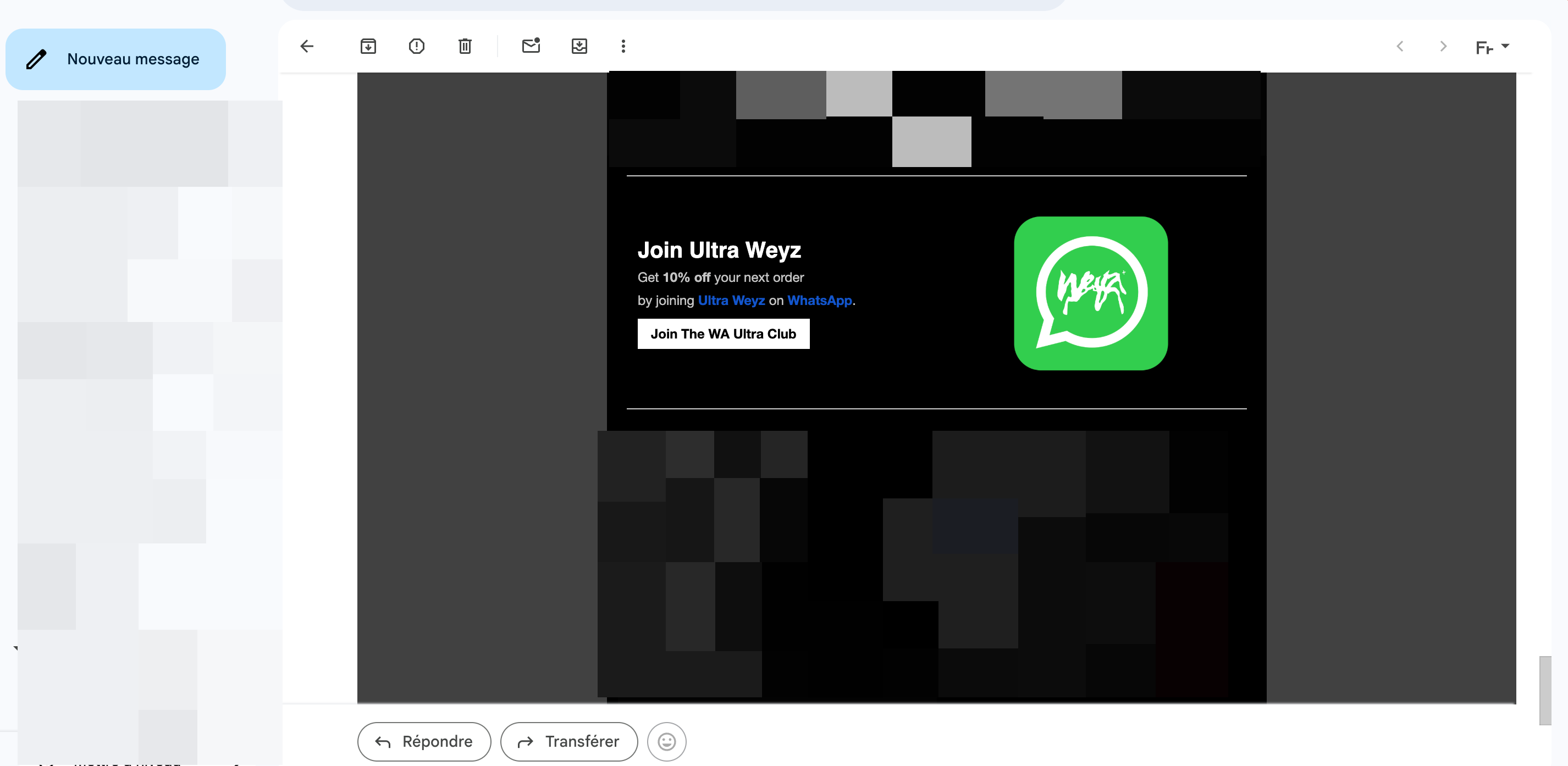
Example from one of our clients redirecting their email subscribers to join the club on WhatsApp.
This message can replace the D-1 campaign: do not send both on the same day.
🚨 VIP ALERT 🚨

In EXACTLY 24h, the VIP Black Friday begins.

Get ready to:
✅ Discover our exclusive products
✅ Enjoy the biggest promos of the year
✅ Try your luck for the 100 golden tickets

See you on the site tomorrow at [TIME]. ⏱

[Button: Go to the site]IT'S ON! 🔥
The VIP Black Friday is NOW live!
The first 100 golden tickets are going fast... Don't wait! 🎫⚡
Happy shopping! 🛍
[CTA: Order now]Send a full recap email with all the products, offers, and giveaway rules.
Create FOMO:
⚠ Already 47 golden tickets won!

53 tickets left to win... Don't miss your chance!

[CTA: Try my luck]Hey [First name]! 👋
VIP Black Friday update:
🎫 Only 35 golden tickets left
⏰ Only 8h until the end
If you are still hesitating, it's now or never! 🔥
[Button: I'm in]Final urgency message:
FINAL HOURS ⏰

The VIP Black Friday ends in 4 hours.

12 golden tickets are still up for grabs.

This is your last chance! 🔥

[CTA: Last chance]In Campaigns, open each campaign to track:
The read rate of your messages (Read)
The click rate on your buttons and links, shown on the campaign detail page
Start collecting leads 10 to 14 days before Black Friday: that is enough to build buzz without wearing out your audience.
Adjust the number of golden tickets to your budget and expected sales volume. The key is to create a feeling of abundance ("there are plenty of possible winners") while keeping scarcity ("you have to buy fast to win").