
We advance these fees for you, then bill you in usage increments.
This guide shows you how to customize your automatic charge amount (Auto-refill) to match your billing to your sending volume.
Understanding the default billing system
By default, Kanal applies a billing threshold of 15 €. This means that as soon as you reach 15 € in conversation spend with Meta, an automatic charge for the same amount is triggered on your payment method.
The problem with small transactions
If you launch a large campaign (for example, a 1 000 € campaign), the default 15 € threshold will generate more than 60 bank transactions and just as many invoices. For high-volume merchants, this can make bookkeeping needlessly complicated.
The solution: customize your Auto-refill amount
Kanal now lets you choose the amount that will be charged each time your balance hits its critical threshold.
For example, if you set an amount of 100 €, Kanal will only charge you in 100 € increments, which drastically reduces the number of lines on your bank statements.
How to change your charge amount?
Setup takes a few seconds from your dashboard:
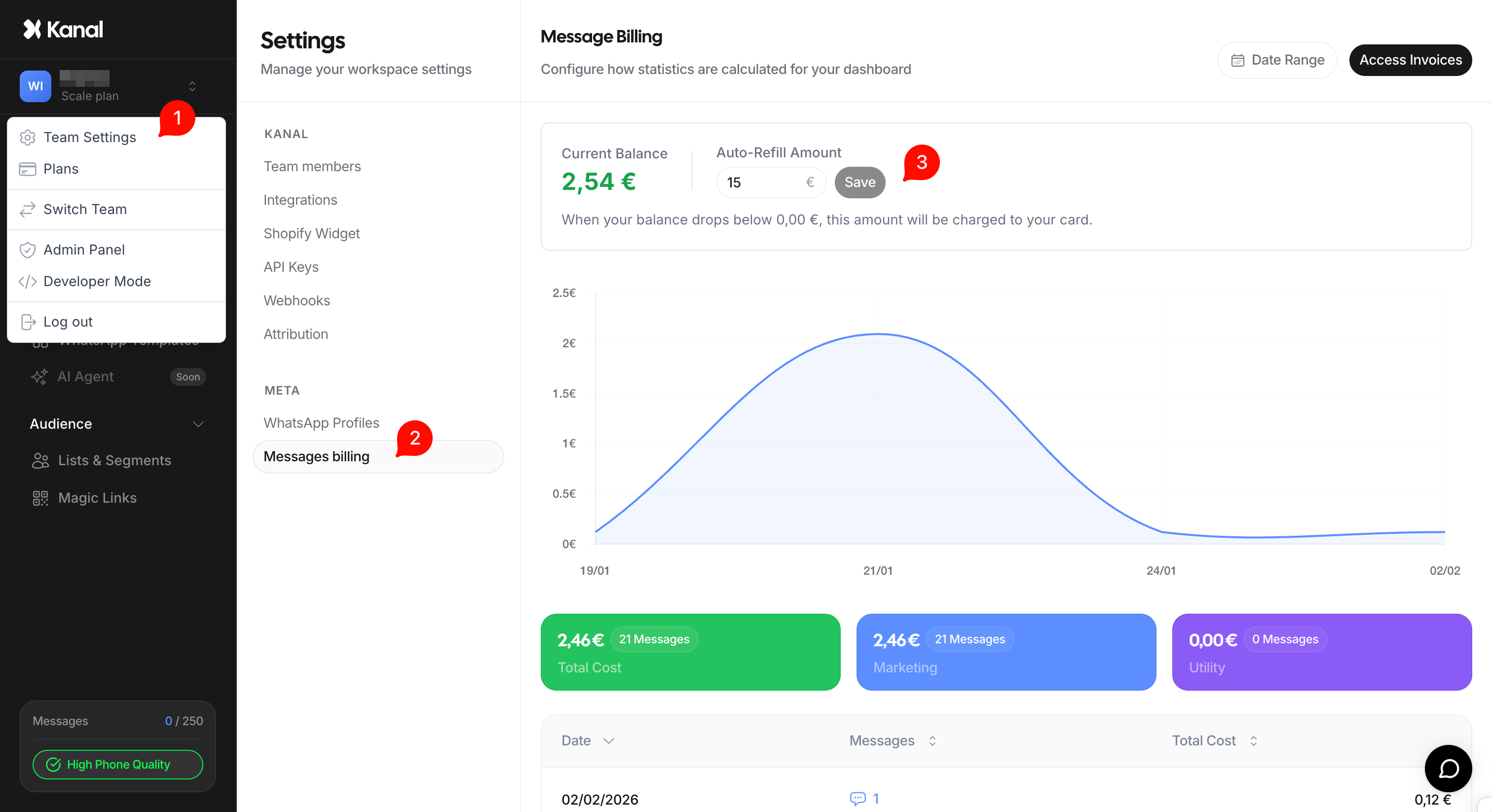
Go to Settings in the left sidebar.
Click the Message Billing section.
Find the field labeled Auto refill amount.
Enter the amount you want charged at each refill (e.g. 100, 250, 500 or 1 000 € depending on your usual volumes).
Save the change.
How does the trigger work?
The system monitors your message balance in real time. When your balance drops below a safety threshold (usually around 0€), Kanal automatically triggers a charge for the amount you entered in the Auto refill amount field.
That amount is then credited to your account to cover your future conversations.
Management recommendations
To pick the right amount, we suggest basing it on your average monthly spend:
Low volume: Keep the 15 € threshold or move to 50 €.
Medium volume: Set a threshold of 100 € or 200 €.
Important note: Make sure your linked payment method has the necessary funds and allows recurring payments of the chosen amount, to avoid any automatic suspension of your WhatsApp campaigns.