
With Kanal's Ready for Pickup trigger, you can automatically send a WhatsApp message as soon as the package is ready to be collected.
How does the detection work?
It relies on a real-time chain of information:
The carrier scans the package when it arrives at the pickup point.
Shopify receives this update and changes the shipment status to Ready for Pickup.
Kanal instantly detects this change through Shopify and fires your WhatsApp automation.
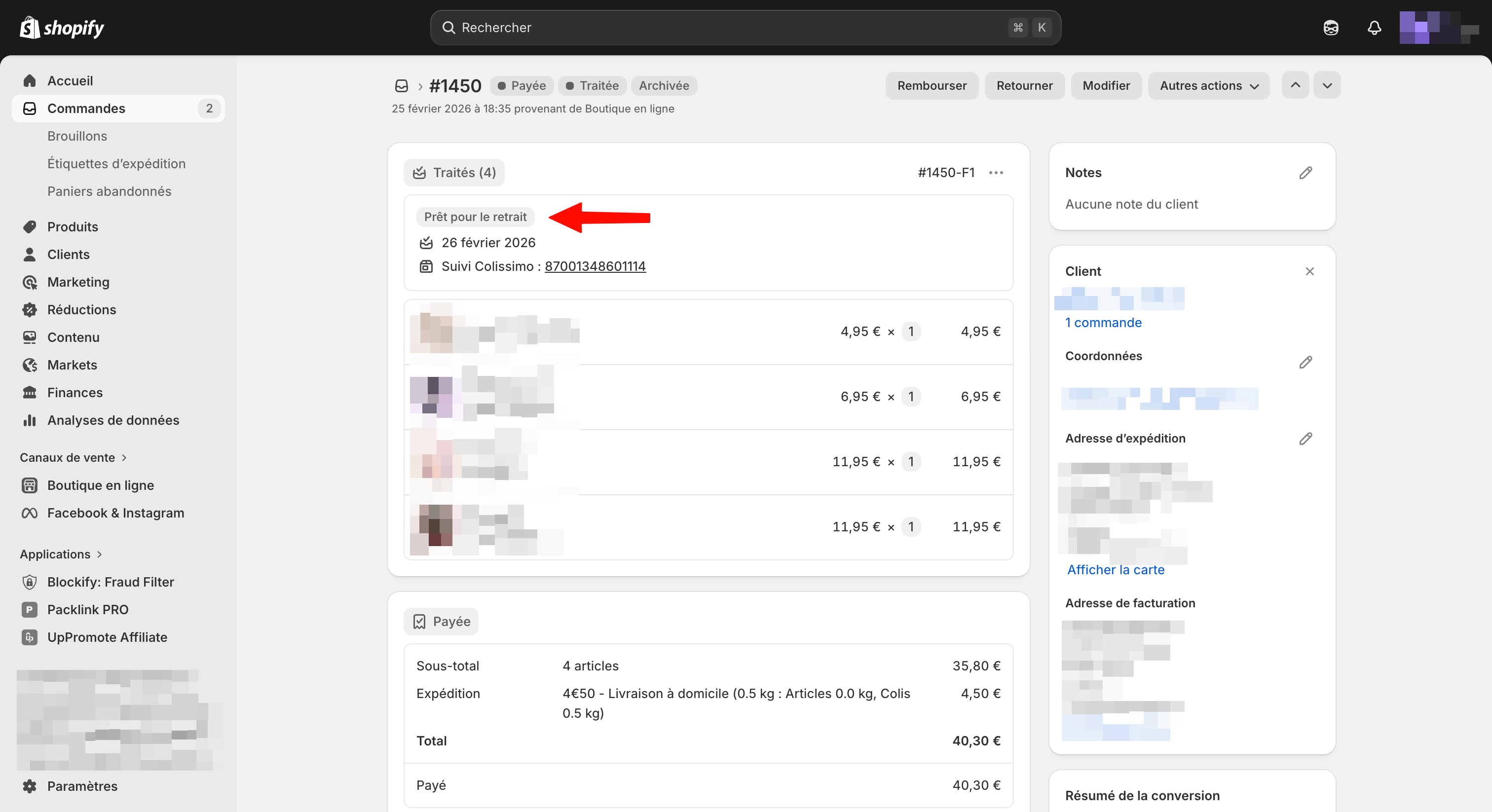
Visual example in Shopify
As you can see in the image below, the status must appear explicitly in your Shopify order view for Kanal to send the message:
Setup steps
1. Create the automation
Go to the Automations section in Kanal.
Click Create Automation.
Choose the trigger: Shipment Update.
In the status options, select: Ready for Pickup.
2. Write the WhatsApp message
Once the trigger is selected, add a Send a message node. We recommend using the tracking variables to help the customer plan the pickup.
Example of an ideal message:
"Good news {{shopify_destination_first_name}}! 👋 Your package has arrived and is waiting for you at your pickup point.
📍 City: {{shopify_destination_city}}
📦 Tracking number: {{shopify_tracking_number}}
You can find all the details and the pickup point's opening hours here: {{shopify_tracking_url}}"
Why is this trigger so important?
Fewer support tickets: Customers no longer need to dig through their email or visit the carrier's site. The info is right in their pocket.
Faster pickups: The sooner the customer is informed, the sooner they collect their package. That frees up space at pickup points and reduces the risk of unclaimed packages being returned to you (and the return fees that come with them).
Customer satisfaction: Getting a WhatsApp notification feels like a premium, thoughtful service.
Requirements for success
For this flow to work perfectly, always check these two points:
Tracking number present: As explained in the automation triggers guide, the tracking number must be filled in on Shopify for the event to be passed along.
Carrier compatibility: Make sure your carrier (Mondial Relay, Relais Colis, etc.) reports step-by-step statuses to Shopify. If Shopify only shows "Shipped" and never switches to "Ready for Pickup", the automation cannot fire.
Tip: If your carrier does not report the "Ready for Pickup" status, check the synchronization guide to learn how to contact your provider and enable this data feed.