The second quarter (April, May, June) is one of the most dynamic periods of the year for e-commerce. Here is a roadmap to adapt your WhatsApp automations and campaigns, to reuse every year.

What customers look for: family, nature, gardening, spring preparations.
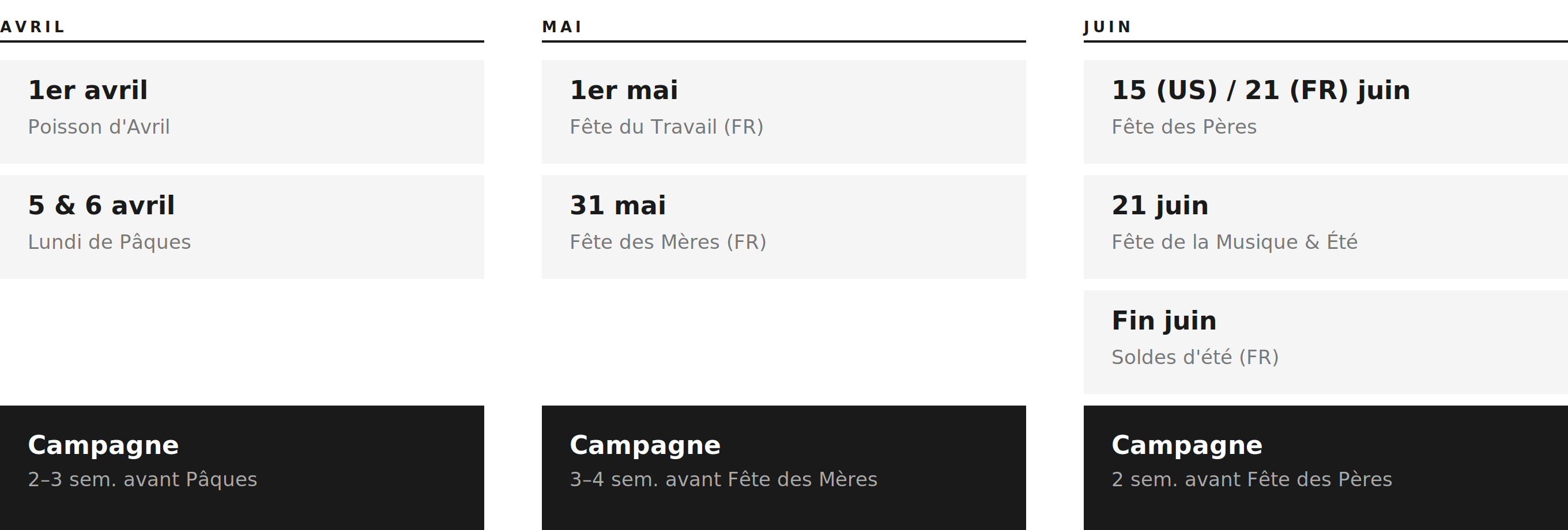
April 1: April Fools' Day, a chance for a funny message or a "No joke" offer.
Easter: Easter Sunday and Monday, in March or April depending on the year.
Easter campaign: start communicating 2 to 3 weeks ahead.
Automation idea: create a magic link (Magic Links menu) for a "virtual egg hunt". The customer scans the QR code on your site or your social media, sends the pre-filled message and receives a unique promo code through the Generate discount code action (Scale plan and Shopify store required).
Targeting: give your loyal customers early access to your spring collection, for example with a "Placed an order at least 2 times" segment (segments: Scale plan required).
What customers look for: gifts, gratitude, outdoor activities, long weekends.
May 1: Labour Day (France).
Second Sunday of May: Mother's Day (United States and many other countries).
Last Sunday of May: Mother's Day in France, moved to the first Sunday of June when it falls on Pentecost.
Plan ahead: Mother's Day is one of the biggest moments of the year. Launch your campaigns 3 to 4 weeks ahead.
Promo codes: with the Generate discount code action, prefer a fixed amount (e.g. 10 € off) to a percentage, which often speaks more for a gift purchase.
Delivery times: with the May bank holidays, warn your customers about longer delivery times, for example in your away message (Settings > Business Hours: click your team name, then Settings).
What customers look for: vacations, travel, beach, celebrations, sales.
Third Sunday of June: Father's Day (France and United States).
June 21: first day of summer and Fête de la Musique.
Late June: start of the summer sales in France (date set every year).
Father's Day: launch your campaign 2 weeks ahead. Use a short video (UGC) showing your products as the "perfect gift".
Sales preparation: send a teaser campaign to your best customers to offer them early access.
Delivery tracking: in June, your customers travel. Check your Shipment Update automations (one automation per status) so they can track their package even on vacation. They require a tracking number and a tracking URL.
Do not send your campaigns to your whole base. Create segments (Scale plan required) with the available criteria, for example:
"Placed an order at least once in the last 16 weeks": your early-year and Valentine's Day buyers, who are probably looking for a Mother's or Father's Day gift.
"Clicked at least once in the last 4 weeks": your most engaged contacts.
A segment does not update automatically: before sending, click "Recalculate" or check "Recalculate before sending".
For each key moment, create a dedicated template directly in your campaign builder. Meta usually approves templates within a few hours, but allow 48 hours. You can also schedule the campaign with "Send on approval".
Tip: add quick reply buttons like "See gift ideas" or "Find my size" to start the conversation.
Your Abandoned Cart automation message in April should not be the same as in June.
In April: highlight renewal and spring.
In June: highlight vacations and fast delivery before departure.
Month | Key moment | Recommended Kanal action |
|---|---|---|
April | Easter | Campaign 2 to 3 weeks ahead + "Egg hunt" magic link. |
May | Mother's Day | Campaign 3 to 4 weeks ahead + unique promo codes. |
June | Father's Day, sales and summer | Teaser for your best customers + delivery tracking automations. |
