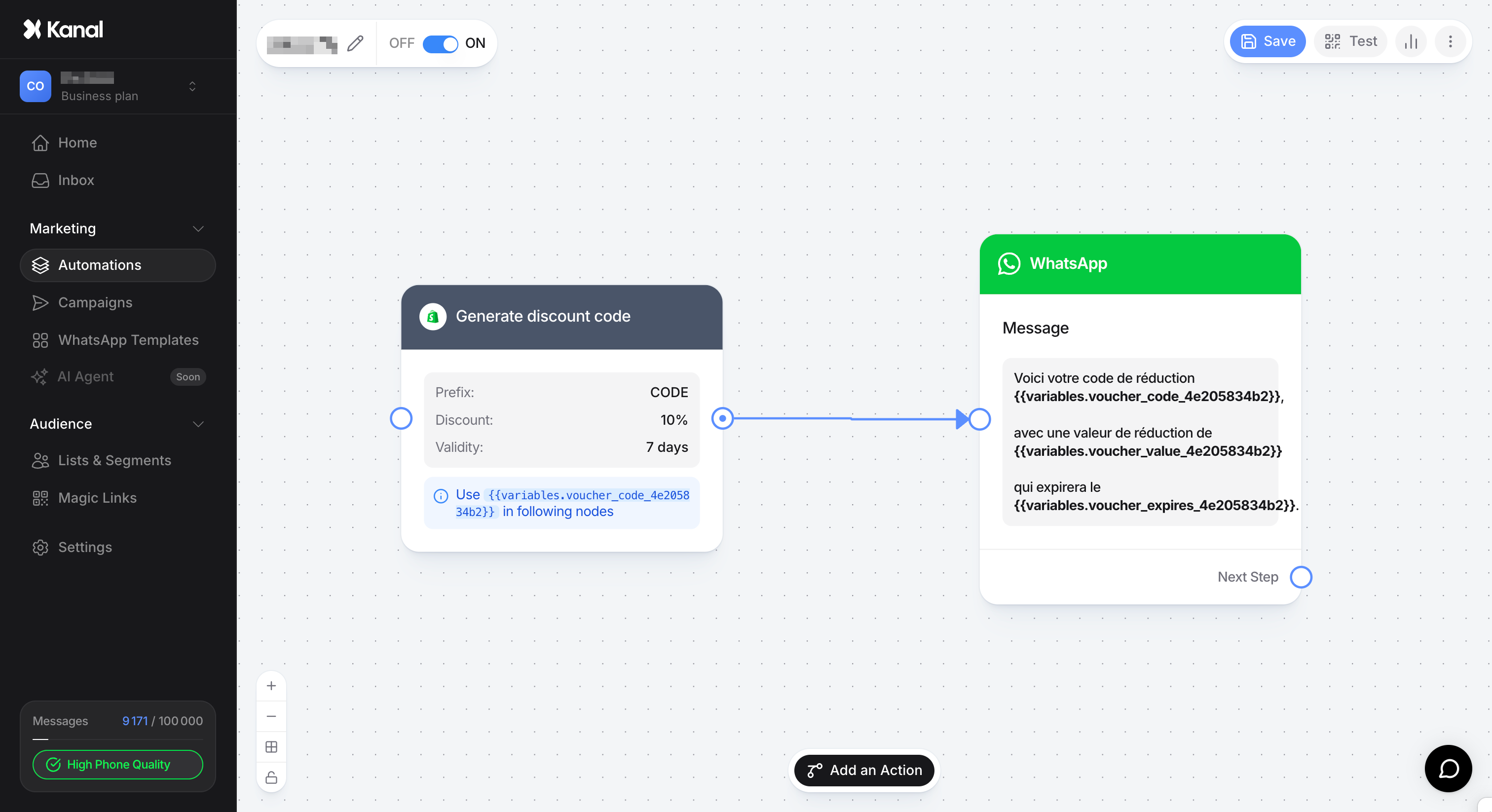
With the Generate discount code node, Kanal lets you automatically create unique, dynamic discount codes directly in your Shopify store, then send them instantly via WhatsApp.
Unlike static codes (e.g. WELCOME10) that can end up shared on coupon sites, dynamic codes are:
Unique: Each customer gets their own code.
Time-limited: You can set an expiration date to create a sense of urgency.
Trackable: You know exactly which WhatsApp message generated which sale in Shopify.
To add this feature to your flow (for example, an abandoned cart or welcome flow):
In the automation editor, click Add an action.
Select the Generate discount code block.
Place this block right before the WhatsApp message that should contain the code.
Click the node to open its settings panel. You can customize the following:
You can customize the beginning of the code so it is easy to recognize (e.g. KANAL-, PROMO-, SUMMER-). Shopify will generate a string of random characters after this prefix (e.g. KANAL-X320).
Choose how you want to reward your customer:
Percentage: A proportional discount (e.g. 15%).
Fixed Amount: A discount in euros (e.g. 10€).
Set how long the customer has to use their code before it is deactivated in Shopify (24 hours, 7 days, 30 days, or unlimited).
Do not forget to click Save once you are done.
Once the node has generated the code, you need to pass it to the customer through a message node. Kanal creates dynamic variables specific to each node (with a unique identifier, e.g. 4e205834b2).
Connect the Generate discount code node to a Send a message node. In the message editor, you can insert the following variables (the ID at the end is specific to your node):
{{variables.voucher_code_ID}}: Displays the generated code (e.g. KANAL-X320).
{{variables.voucher_value_ID}}: Displays the discount value (e.g. 15% or 10€).
{{variables.voucher_expires_ID}}: Displays the code's expiration date.
"Hi! To thank you for your interest, here is a gift just for you:
Your discount code: {{variables.voucher_code_4e205834b2}}
Worth a discount of {{variables.voucher_value_4e205834b2}}
It expires on {{variables.voucher_expires_4e205834b2}}. Use it fast!"
As soon as the customer reaches the node in your automation:
Kanal sends a request to your Shopify store.
Shopify creates a "private" discount code with the rules you defined.
The code is stored in your Shopify admin (Discounts section).
Kanal retrieves the code and inserts it into the WhatsApp message sent to the customer.
Expert tip: Combine this feature with a Delay node. For example, wait 1 hour after an abandoned cart before generating and sending a 10% discount code valid for only 24 hours. It is one of the most profitable plays on WhatsApp!
