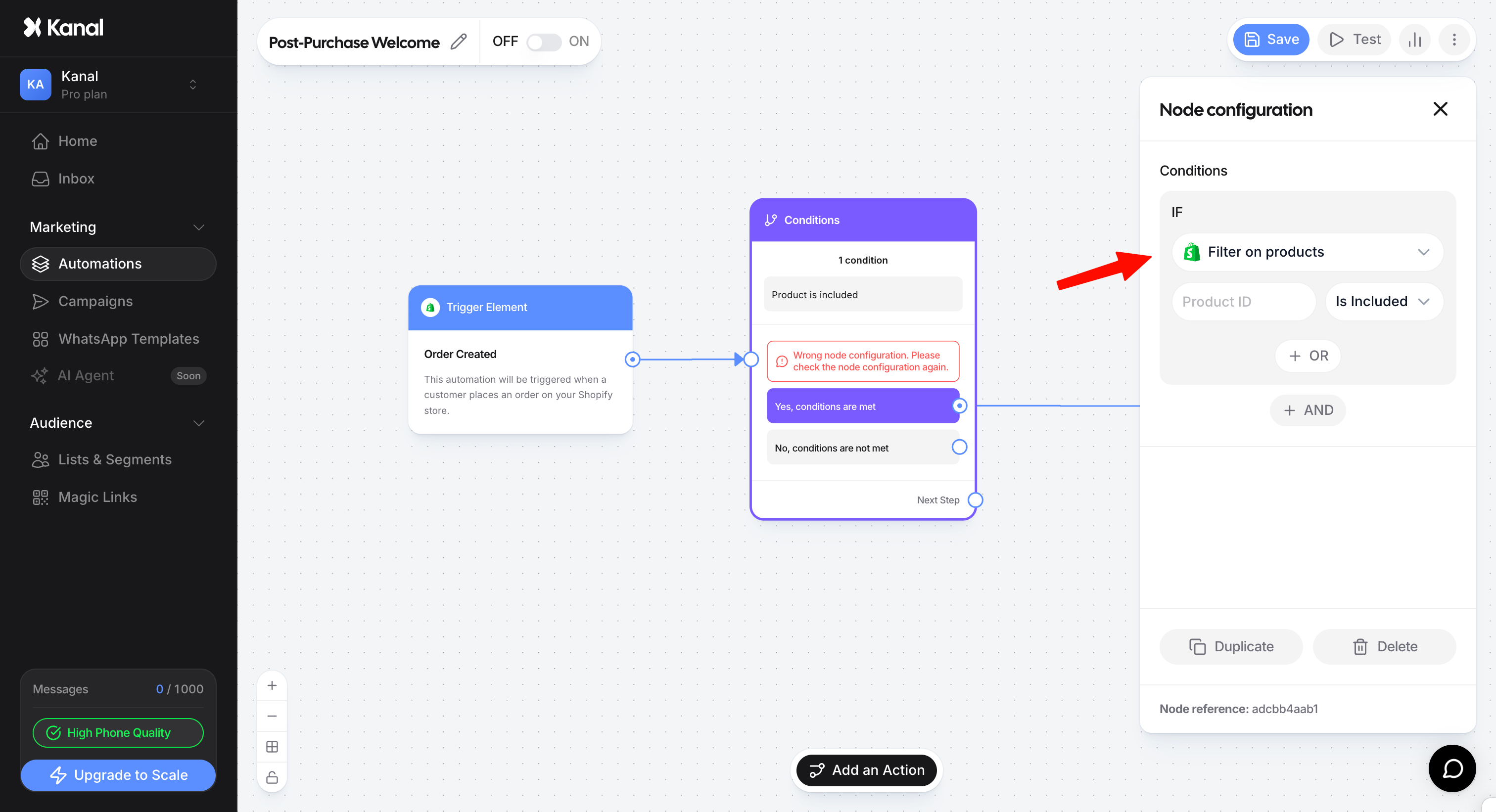
Personalizing the post-purchase experience is a powerful lever to grow your customers' lifetime value (LTV). By filtering orders on a specific product, you can build highly relevant recommendation flows.
This feature is available for every automation that triggers after a transaction, in particular the Post-purchase and Shipment update (delivery tracking) triggers.
Step 1: Find the product ID in Shopify
Before building your flow in Kanal, you need the unique ID of the product you want to target or exclude.
Log in to your Shopify admin.
Go to the Products section and open the product you want to use.
Look at the URL in your browser's address bar.
The product ID is the string of digits at the very end of the URL.
Example: If the URL is "[suspicious link removed]", the ID to copy is 8123456789.
Step 2: Set up the filter in your automation
Once you have the ID, you can set up the segmentation in Kanal's automation editor.
Right after your trigger (for example Post-purchase), add a Conditions node.
Click the node to open its settings and define the following rule:
Criteria (IF): Choose Filter on product.
ID field: Paste the numeric ID you copied earlier.
Operator: Choose between Is included (to target customers who bought this product) or Is not included (to target those who did not).
Use case: Setting up a smart cross-sell
One of the most common use cases is offering a complementary accessory only to customers who do not own it yet. Say you want to offer a cap to every customer who places an order, as long as they did not already buy that cap in the current order.
Flow setup:
Trigger: Post-purchase (order created).
Condition node:
Criteria: Filter on product.
Product ID: [your cap's ID].
Operator: Is not included.
Branching logic:
"Yes, conditions are met" path: This path runs when the customer does not have the cap in their order. You can then connect a delay node (for example 2 hours) followed by a WhatsApp template with a special offer on the cap.
"No, conditions are not met" path: This path runs when the cap is already in the order. In that case, leave this output unconnected to avoid sending an irrelevant offer.
Why use exclusion (Is not included)?
Exclusion filtering is an advanced technique that keeps your brand communication consistent. It prevents the classic mistake of sending a promotion for an item the customer just paid full price for. With this logic, your cross-sell offers become much smarter and less intrusive, which drives a better conversion rate on your WhatsApp campaigns.